ElectriQ 35" Ultrawide 100Hz Curved Gaming monitor
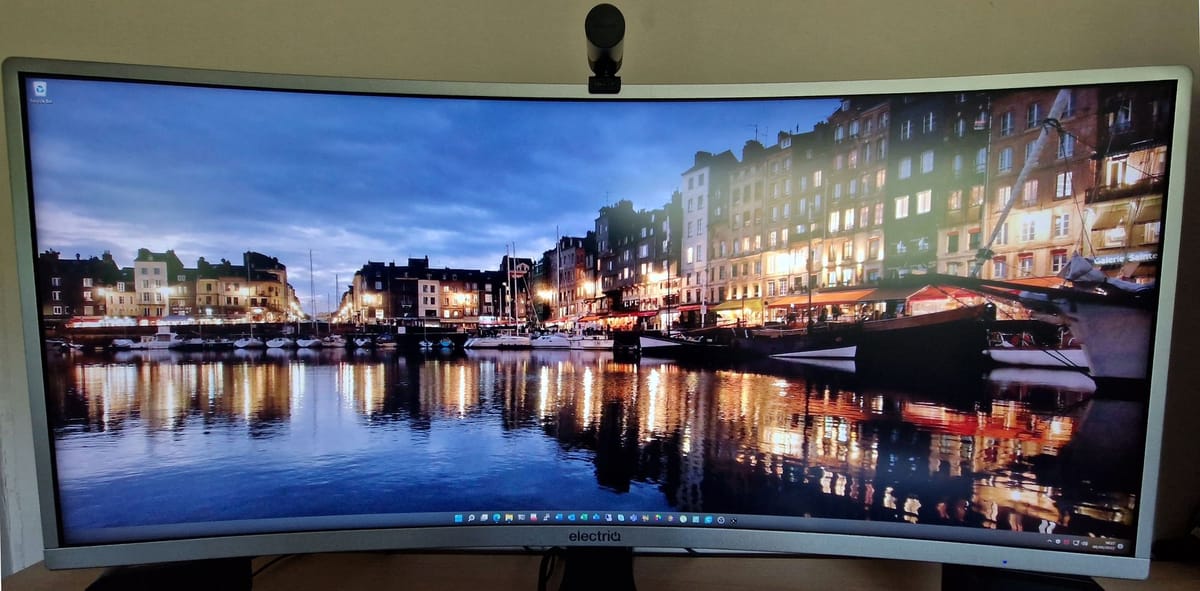
I bought this monitor mid-April as it was on offer at laptops direct (non-affiliated link), compared to other sellers this was about a £40 saving. I had actually been watching it for a while but was unable to find any reviews on this myself, there were reviews for other ElectriQ monitors, but not specifically this one.
I have always had a dual monitor setup and was previously using 2 x BenQ 24" 1440p monitors, I preferred the dual-monitor setup from a productivity perspective, but this caught my eye, so I went for it. Changing from a dual-monitor setup to a single, but ultrawide monitor, I can honestly say adapting hasn't been as hard as I thought it would be, that's partly due to the fact the screen gives me almost the same estate to work in, that, and I have started to use Windows 11 virtual desktops to separate my work and personal desktops.
Aesthetically I like this monitor, it has a nice angle to the curve and a fairly thin depth to it, the bottom (~2cm) is larger at the back than the top (~1cm), this monitor does support audio, but only via the headphone jack built-in to the connection panel at the side. Oddly the power cable and video cables connect either side of the monitor, the power goes in the left side and HDMI, DisplayPort, USB and audio, the right side. From what I have read, the USB port is only for firmware.
The ports; there are 3 x HDMI ports (2 x 1.4 and 1 x 2.0) and 1 x DisplayPort (1.2a) - a DisplayPort cable is included in the box (although some sites do say HDMI cable, so bear this in mind). The monitor has tilt and height adjustment, but not swivel. Resolution is 3440 x 1440 at 100Hz - but do note this 100Hz only applies to DisplayPort. The monitor also supports HDR, though not detailed online, this does not apply when using the DisplayPort connection and will only work under HDMI 2.0, so you need to choose either 100Hz with DisplayPort or HDR under HDMI 2.0. While HDMI 2.0 does support 100Hz, there are reviews online that state the monitor will only do 60Hz when using the HDMI ports. I have not tested this, so bear this in mind too.
The Ultrawide WQHD resolution of 3440 x 1440 is a 21:9 aspect ratio, so great for films made in this aspect, with a 2ms response time and the ability to swivel 90 degrees for those who want portrait mode. The monitor, also not advertised, does support PiP (picture in picture) and PbP (picture by picture), this is enabled using the joystick controls on the back of the monitor - which by the way is in the most awkward position. It's uncomfortable getting at it from below the panel and just as annoying from the right hand side, personally I would have preferred it either at the bottom right corner or top right corner closer to the edge, as it is you need long fingers to get at it from the bottom or side right hand side and from below it's very uncomfortable. To be fair though, it's not like this is something you adjust very often, so a minor annoyance, but an annoyance all the same. Sadly, unlike other companies out there this does not come with software to allow control over the settings from within Windows - that would be a nice touch and make enabling/disabling PiP/PbP and switching between inputs so much nicer.
Along with the awkward access to the input/menu selector, the bottom of the panel also gets very hot - too hot if you purposely put your hand on it for more than a few seconds, especially around the very centre of the screen where the ElectriQ logo is. A quick search online suggests this is true for other ElectriQ monitors and may be attributed to why they are cheaper than other brands - only time will tell if this has any lasting impact on the device itself. They do come with a full 2 year warranty though, hopefully something that wont be required. As an aside, the monitor panel itself is made by Samsung, so it's a name you can trust.
Final thoughts;
This is a great monitor at a budget friendly price, it's not without it's flaws, but even the top of the line systems have their quirks. This, being on the cheaper side of things means you should give a little more leeway when taking in to consideration the downsides of this screen when compared to it's more expensive rivals. If you don't need both HDR and 100Hz refresh rates at the same time, take that in to consideration, why spend two-three times as much to get both, when you may never need them both, together. Likewise with the uncomfortable and awkward controls in their current position, bear this in mind if you like to frequently change inputs or settings, if you're a set it and forget it person, don't let this put you off.
I hope you found this review useful.